Full Refresh vs Incremental Pipelines
Tradeoffs Every Data Team Should Know
Hi, fellow future and current Data Leaders; Ben here 👋
Today I wanted to get back to talking about data pipelines!
Before we jump into today’s article, I wanted to let y’all know that today’s article is sponsored by me, the Seattle Data Guy!
Our team has helped dozens of companies turn data into actual business outcomes. We’ve also helped companies set up their data stack from the ground up, as well as untangle their current data infrastructure. If you’re looking for an experienced data consulting team to help you set-up your data infrastructure and strategy, then set-up some time with me today!
Now let’s jump into the article!
The need to extract and centralize data…surprisingly…remains a challenge.
Perhaps in the future, when we can all vibe code our own apps on Snowflake or Databricks Postgres services, and the line between analytical and operational data stores blurs further, we won’t need this.
But for now, even small organizations can have dozens of data pipeline solutions pulling out data.
It’s easy: find a reliable data connector solution, build a few dbt models or some drag-and-drop solutions, and you’re done.
Of course, it’s not that simple. As part of the process, you need to consider how those pipelines will actually load data into your tables.
Which also means you need to understand your data.
Is there an update date? Can it be updated? How is it updated?
From there, you can start understanding how you want to build your data pipeline.
Bringing us to today’s topic, incremental and full table refreshes.
So let’s dive into it!
Why Does This Even Matter?
At first glance, this might seem like a small implementation detail.
After all, a pipeline is just moving data from point A to point B, right?
But the way you design your pipeline matters. It has implications for how reliable, affordable, and scalable your pipeline is, not to mention the fact that different data platforms can limit how you implement your pipeline.
The difference between these patterns affects:
Compute Costs - This is likely the most obvious. If you rebuild a 1TB table every day with a full refresh, your warehouse bill will look very different than if you only process the new 5GB of data that arrived today. Both your data team’s spending and wait times will increase. Of course, you could still be on-prem, so it might not be an actual cost and more of a performance issue.
Ease of Implementation - Using create and replace make your pipelines very simple to implement. There really isn’t much design at all to it. Just have a CREATE AND REPLACE over a SELECT statement, or if you’re using dbt, just have it recreate every time. Done. Whereas, with incremental loads, you actually have to understand the underlying data, gross…who wants to do that?
Backfilling - Both patterns have different pros and cons when backfilling. Say, for instance, you’ve got a rather large table that takes a long time to reload. If you’ve got to do a full refresh, recreating can be painful(of course that also means, everyday the pipeline is taking a long time to run). But if your table is small and you don’t need to consider past data, it’s very simple. Click rerun, and done!
Handling Updates and Deletes – Not all data sources behave the same. Some append data forever. Others constantly update rows or delete them. Your pipeline design needs to account for whether you’re dealing with append-only logs or mutable records.
Tooling Constraints - This is more of a consideration vs an impact. Your data platform also influences what’s possible. Redshift was one of the first platforms I ran into where this was a reality. Early on, MERGE wasn’t possible. Meaning the way you designed your pipelines changed. The same thing could be said about insert and overwrite tables.
Enough about considerations and impacts, let’s talk about these two common patterns.
Full Refreshes
This pattern is likely the most obvious and simple pipeline to build.
You’ll probably build this type of data pipeline by default.
As the name suggests, you are just replacing all the data via a full refresh.
All you need is a create and replace. Of course, there are other steps you might put prior to the final “CREATE OR REPLACE”
For example, you might use the WAP pattern, as some people have coined it, or write-audit-publish
The flow usually looks something like this:
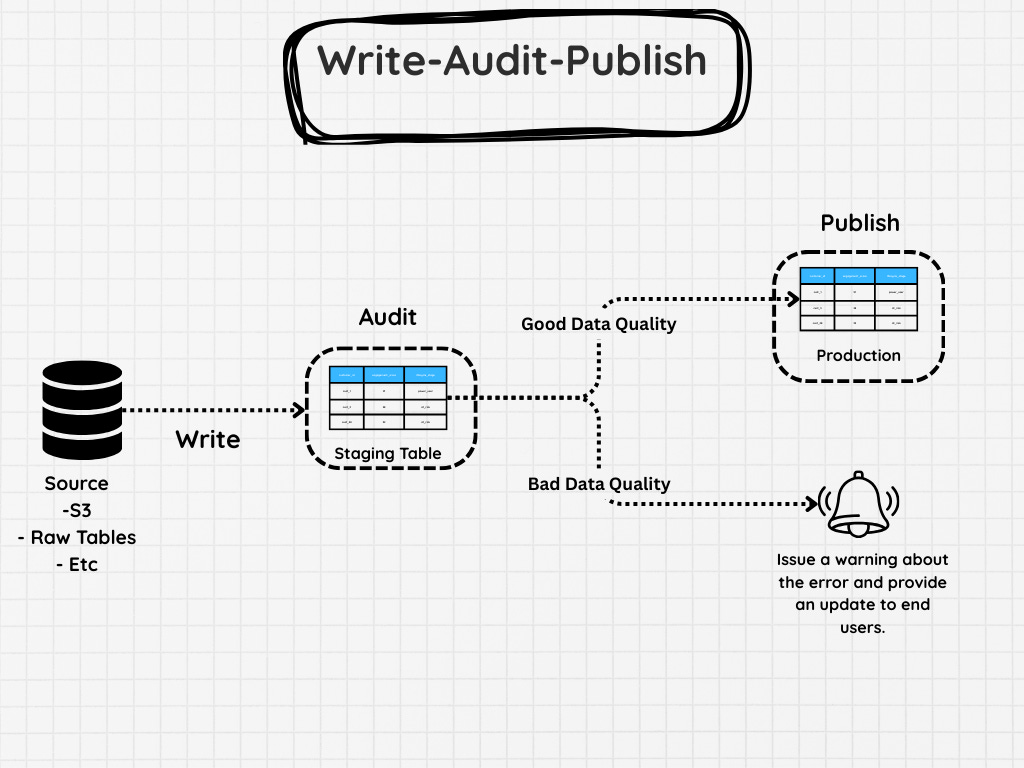
Write – First, create a staged version of the data set. This might be a full transformation from the source system or a large query that reconstructs the table.
Audit – Run data quality checks on the staged data. These might include things like:
Row count comparisons with the previous version
Null checks on required columns
Duplicate key detection
Validation that key metrics are within expected ranges
If any of these checks fail, you stop the pipeline before the production table is touched.
Publish – If everything looks good, then the data can be promoted to production.
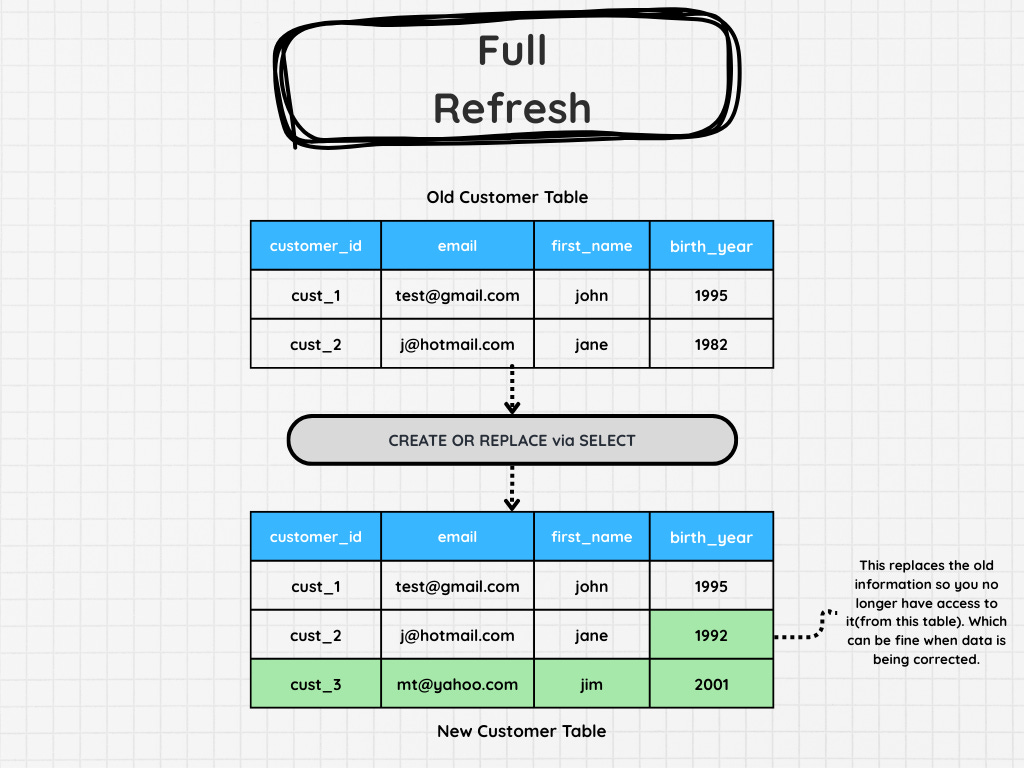
Pairing this approach with a full refresh adds a layer of safety. Instead of modifying your production table directly, you only publish data that has already passed validation. But of course you can do something similar with incremental patterns as well.
Going back to full refreshes, let’s talk about when these work well.
Full refreshes works especially well when:
The dataset is relatively small
Rebuilding the table is inexpensive
The underlying data does not have reliable change tracking
Simplicity is more important than efficiency
However, as tables grow larger, refresh windows shrink, or stakeholders expect fresher data, full refresh pipelines start to break down.
That’s where the second major pattern comes in.
Incremental
As your data grows or when you need to consider historical data, you’ll likely start looking for a different approach.
Rebuilding an entire dataset every time your pipeline runs simply becomes too expensive, too slow, or both.
That’s where incremental pipelines come in.
Instead of recreating the entire table, incremental pipelines only process the new or changed data and merge it into the existing dataset.
So instead of rebuilding 1TB of data, you might only process the 5GB that arrived since the last run.
This dramatically reduces:
Compute costs
Pipeline runtimes
Warehouse load
Downstream refresh delays
I’d also add that incremental pipelines aren’t a single pattern of pipeline. There are several ways you can implement incremental pipelines depending on the underlying data set.
Date And ID Appending
Two simple approaches most data pipelines follow are to use dates and IDs as watermarks for where to load new data.
ID Appending
If there is a unique ID, this is relatively simple. Only insert IDs that are new(Assuming no data will change).
There are two common ways to do ID-based incremental loads:
load rows where
id > max(id)already in the targetload rows where the
iddoes not already exist in the target
The MAX(id) approach is faster(or at least it should be), but it assumes IDs always arrive in order and that you never miss older rows.
The NOT EXISTS approach is safer in the sense of not missing rows, but usually more expensive because it has to compare incoming rows against what is already loaded.
Date Appending
Dates…something you’d assume every database would have in it.
The number of times I’ve come across a Postgres instance that maybe had a create date and no update date….
It’s far too many times. In one case, I recall working with a Postgres instance where I was excited because they had an update_date on most of their tables. I was later disappointed to learn it was never actually used.
Now, some of you might be wondering why I care so much.
It’s because reliable timestamps make incremental loading much easier.
If you know the latest date already loaded into your target table, you can simply load anything newer than that date.
For example, if your target table already contains data through 2026-03-14, then you just load everything that is greater than said date. You can use something like the query below.
INSERT INTO analytics.orders
SELECT *
FROM raw.orders
WHERE order_date > (
SELECT max(order_date)
FROM analytics.orders
);That works well when:
Data always arrives in order
Old records do not change
There are no late arriving records
But real systems are often messier than that.
Sometimes records for yesterday show up today.
Sometimes, for one reason or another, your pipeline might not run at the right time and might miss data.
Sometimes a load partially fails and you do not realize it until later.
Because of that, many teams use a small lookback window instead of only loading data strictly after the max date.
That might look like this:
DELETE
FROM analytics.orders
WHERE order_date >= CURRENT_DATE - interval ‘2 day’;
INSERT INTO analytics.orders
SELECT *
FROM raw.orders
WHERE order_date >= CURRENT_DATE - interval ‘2 day’;This approach is less efficient than a pure append, but it is often much safer in terms of late arriving data.
In other words, you trade a little extra compute for a lot more reliability.
I’d also say this is a more complex and possibly error prone approach if only one step completes in an unsafe way.
Upsert/Merge
You know, until I had to work on Redshift, I never heard the term “Upsert”. It feels like a term they created just because they, at the time, didn’t have Merge functionality. It’s a great example of the underlying solution you pick, which changes the way you have to build your data pipelines.
Small details impact how you’ll build your pipeline.
Are you writing date partitions and using insert and overwrite, or a more traditional table?
Are you able to use the merge function?
These all play a role.
Getting to the actual topic.
Merge and upsert have some similarities. In both cases, the idea is that you’re looking at what data already exists based on some sort of unique identifier and then inserting new data and updating data where you have matching IDs.
Technically, you could do other things, like delete data as well, but in most cases, that’s the goal.
Let’s talk through a quick example. Let’s say you have:
A target table -
analytics.customersA source table -
staging.customers
You want to insert new rows into the analytics customer table and update where the IDs match.
Like in the image below.
The code would look something like the below.
MERGE INTO analytics.customers AS target
USING staging.customers AS source
ON target.customer_id = source.customer_id
WHEN MATCHED THEN
UPDATE SET
target.email = source.email,
target.status = source.status
WHEN NOT MATCHED THEN
INSERT (customer_id, email, status)
VALUES (source.customer_id, source.email, source.status);But wait, there are still other patterns I’ve seen for updating data tables.
Aggregation
I’ve actually run into another sort of append pattern. This seems to be particularly common with more accounting-like systems. I’ve had to deal with it both when working on finance and healthcare teams.
For this pattern, you don’t just delete data based on a unique ID or date. You actually aggregate data to ensure you capture corrections.
For example, imagine an insurance provider decided to change how much they were charging you. Instead of deleting the old information and replacing it, they simply add a new row with the amount required to change it. This could either be negative or positive.
I wouldn’t say it’s a common situation. But it’s always worth double-checking!
Final Thoughts
Full refreshes optimize for simplicity and certainty.
There aren’t a lot of moving parts and you can just hit rerun when you want to backfill the data.
And if you don’t care about historical data and have all day to wait for tables to be rebuilt, hey just make every table a full refresh!
However, most teams eventually hit the limits of that approach.
At some point the tables get too big, refresh windows get too tight, or the warehouse bill starts raising eyebrows in the finance department.
That’s when incremental pipelines start looking a lot more appealing.
If you’ve got any good examples of where to use one approach vs the other or perhaps other hybrid approaches, feel free to share!
As always, thanks for reading!
Articles Worth Reading
There are thousands of new articles posted daily all over the web! I have spent a lot of time sifting through some of these articles as well as TechCrunch and companies tech blog and wanted to share some of my favorites!
Database Federation: Decentralized and ACL-Compliant Hive™ Databases
One of Uber’s data warehouses powering the Delivery business outgrew its original design. More than 16,000 Hive datasets and 10 petabytes from multiple business domains lived inside a single, monolithic database—owned and operated by a centralized delivery Data Solutions team. While this one-big-bucket setup once simplified onboarding and discovery, scale and organizational growth turned the same design into a liability. The monolithic design had many limitations.
Layer by Layer, We Built Data Systems No One Understands
Tech folk are like onions; we have layers.
Actually…its more like we love the idea of layers.
Network layers.
Medallion architecture.
Layer, after layer, after layer.
On one side, these layers help delineate where on process or job starts and another ends..
But on the other side, we tend to keep layering more and more layers on top of each other. Adding new roles, new tools, new platforms.
All to make things “easier”.
Think of the Modern Data Stack.
Snowflake, Databricks, and all the other tools. They did make things easier in so many ways. But also, I’ve helped companies save millions on compute costs.
Many times, because data teams kept adding layer upon layer that just needed to be removed.
Don’t worry, we’ll discuss that later. Let’s start by discussing the pros and cons of systems and tools that make development easy.
End Of Day 213
Thanks for checking out our community. We put out 4-5 Newsletters a month discussing data, tech, and start-ups.
If you enjoyed it, consider liking, sharing and helping this newsletter grow.


I recently engaged in a fascinating discussion about best practices for data refreshes. One person insisted that "incremental refreshes are always best," but that didn’t sit right with me. So, I reached out to another expert who offered a refreshing viewpoint: “It truly depends on the use case!” This highlights the importance of evaluating each situation individually rather than following rigid guidelines. It's exciting to explore these nuances!
Thanks for the clear explanation ! 😉