
Common Data Pipeline Patterns You’ll See in the Real World
A practical look at the many ways data pipelines show up inside real companies
Hi, fellow future and current Data Leaders; Ben here 👋
This is the first newsletter for 2026!
One of my goals in 2026 is to put together series. So this is the first of a longer series focused on data pipelines. I wanted to start out by discussing the types of data pipelines I’ve seen in terms of how they are used as data pipelines can be used for more that one specific use case.
Some of this content will also live inside the Data Leaders Playbook, along with upcoming webinars and discussions. If you don’t want to miss what’s coming next, you can sign up here.
Now let’s dive in!
Whether you’re working at a large enterprise or a small business, there has likely been some need to take data out of the various source systems, process it, and then use it for either operational or analytical purposes.
Add in a few lines of code or a low-code solution, and the term data pipeline might start getting thrown around.
This might make some data engineers angry, but if you think about it, someone extracting data from a data source into Excel, adding in VLOOKUPs, some data cleansing via formulas and IFELSE() statements is essentially building a data pipeline….
Ok, it’s not the exact same thing, but when you stop and think about it, it can functionally solve a similar problem(although often in a more limited and specific way)
My point is that there are a lot of different ways and reasons people build data pipelines.
So, to kick off 2026, I wanted to discuss some of the key reasons data pipelines exist and the types of pipelines you will run into.
Source Standardization Pipelines
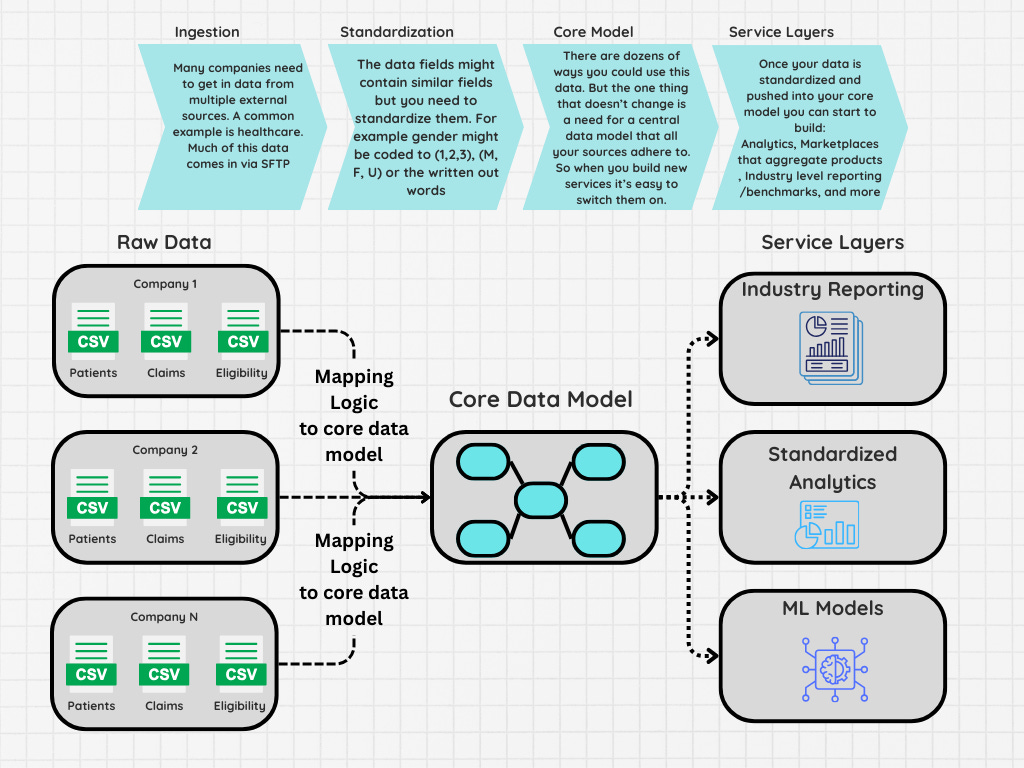
Some of the first pipelines I helped build and manage were focused on taking data sets from dozens of companies and standardizing them to a single core data model. In particular, this involved getting data via SFTP in different formats, including comma-delimited, pipe-delimited, XML, and even positional files, where you had to have a separate file that would define which columns contained which rows.

This might be unfamiliar to data engineers who are accustomed to build data pipelines to answer questions around SaaS products such as retention and churn.
But this is a problem I’ve run across now many times across many different industries from health care to retail and real estate to name a few.
In many cases this wasn’t even purely for analytics. The centralization and standardization of the various data sets allowed the companies to provide operational benefits or other services. For example, maybe you’re trying to create a marketplace and need to centralize dozens of different inventory sources.
The challenge when building these data pipelines is usually that amount of effort required to onboard and actually create scripts that can manage all the variations of how different data will come in. This is referred to as mapping.
You’ll need to:
Standardize values such as gender which can often come in as a number, single letter or the written out word
Standardize on categories, I’ve seen this a lot in retail where products might be in the same category, but one might use an abbreviation or a different word that means a similar thing
Fix date and format inconsistencies, such as different time zones, different date formats, or missing values entirely
And of course more such as how each data set might be appended. You can mitigate some of this by asking your external partners to send data in a way that is standardized, but it’s difficult to fix every issue.
Once you do have a standardized data set, you can build multiple products off this data. Whether it be a marketplace or an industry level report and because it’s all standardized it’s easy to apply new products and features for all your customers.
The one final point I will add is that this is not just limited to SFTP data sets, I’ve worked with companies that pull in data from APIs as well.
Amalgamation Pipelines
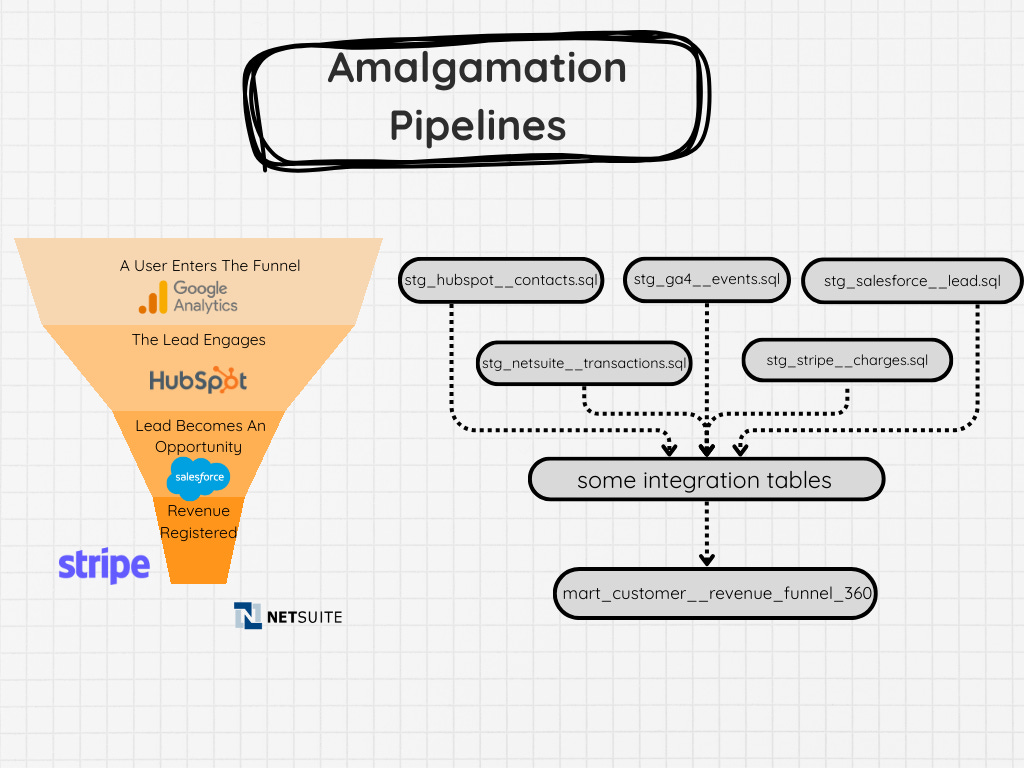
Another type of data pipeline I often run across involves amalgamating multiple sources into some sort of single table. This often is used to reflect some sort of funnel or 360 view of a customer. This is different from entity standardization(at least a little bit) because these pipelines’ goal is to take multiple data sources and piece together a flow.
A common example of this is a sales funnel, where you might be trying to attribute a customer or track information about how long they might have been in different stages of the pipeline.
In that business flow, you might have HubSpot, Google Ads, your own custom solution or application, Salesforce, NetSuite, Stripe, and a few other odds and ends. And you somehow need to track each step.
I recall a similar challenge with mapping out the flow of recruiting data at Facebook. That was a little easier because much of it was through Facebook’s own internal tooling, but we still brought in other data sets that represented various steps and had to deal with issues such as orphan events or individuals that jumped in and were missing certain steps.
The challenge here is having an ID that you can reliably join between your various data sources. Once that is established, then you’ve got to ensure all the sources land at the right time and you’ve set up reliable data quality checks that look for possible duplicate customers and entities, late landing data sets, etc.
Excel “Data Pipelines”
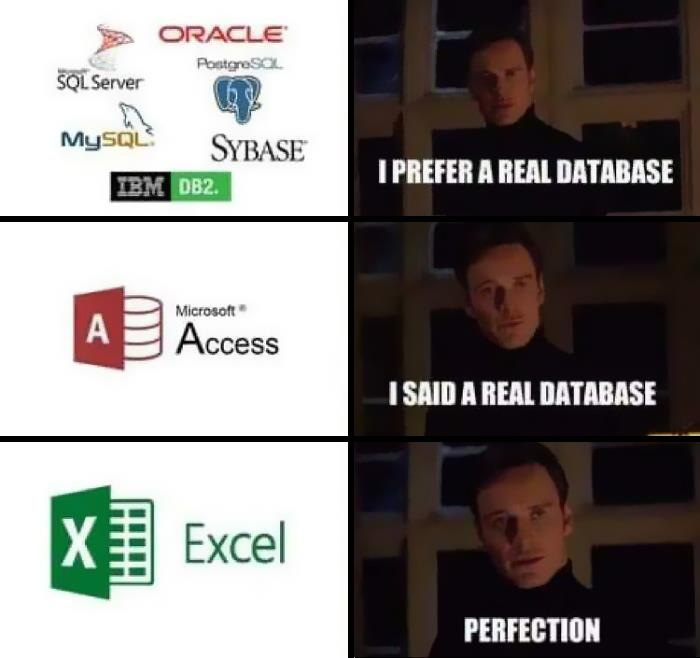
I didn’t want to talk about this pipeline first, because I am sure some of you would be up in arms.
Excel is not a pipeline tool!
And sure, I wouldn’t classify it as a data pipeline tool.
But when we look at how some people functionally use Excel, it’s not that dissimilar compared to how some people might build their data pipelines.
Think about it.
They extract the data from one or multiple source systems
Put them into various spread sheets(not too dissimilar from tables)
From there they often run VLOOKUPs, case statements, sometimes even VBA
All to create a final output
This final output might support a dashboard, report, powerpoint
All via Ctrl+c and Ctrl+v
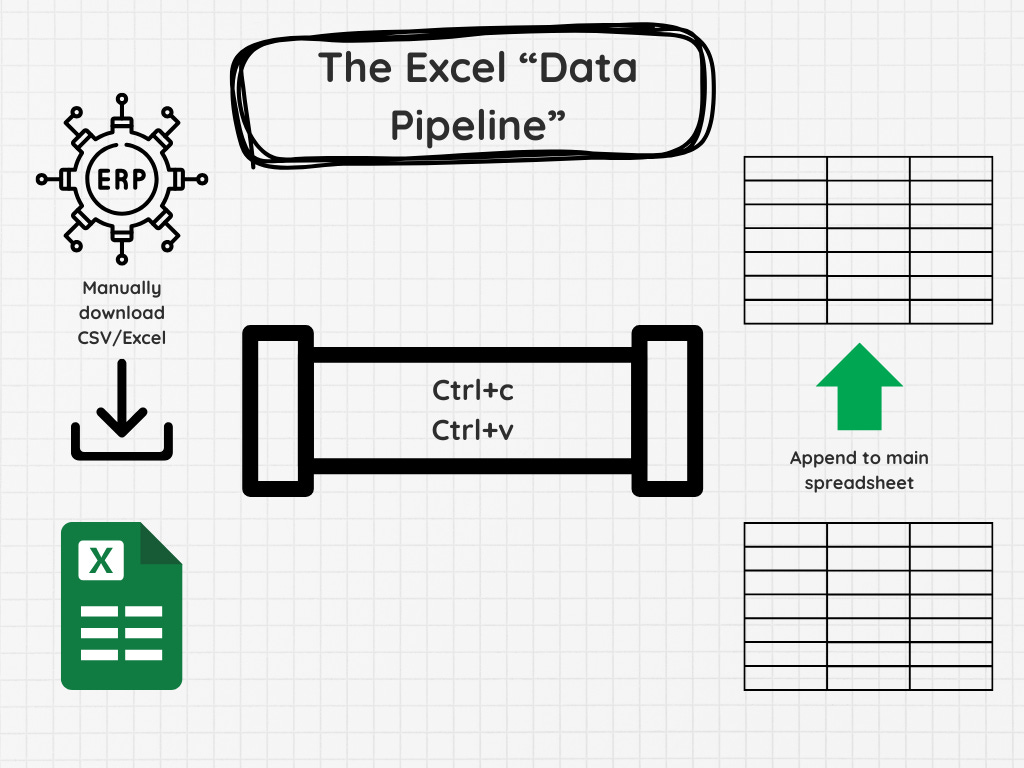
Which is not that different to the pipeline you might be building right now.
Except for the destination is a data warehouse and is hopefully used by a much larger target market inside your company.
So yes, Excel is not exactly a great automated pipeline solution. But many companies rely on it to be their transformation layer and in some cases their…shudders…database.
That is of course until they eventually ask someone to productionize and automate their process…
Enrichment Pipelines
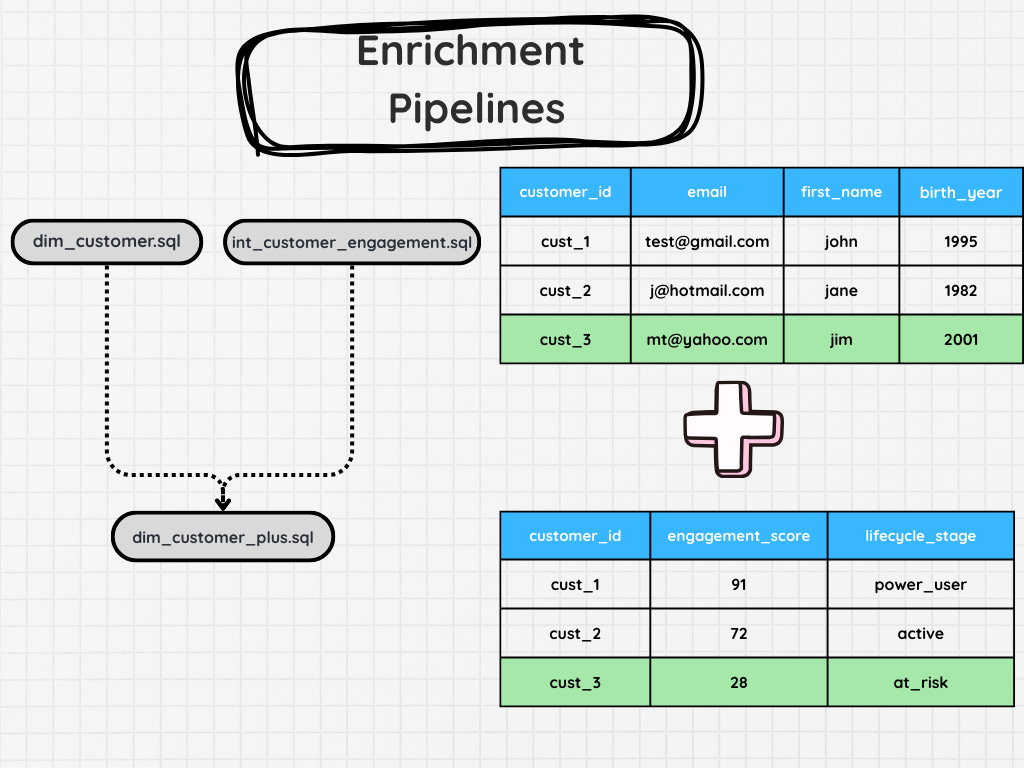
Not all the data you need will exist in your core tables. In turn, you might have to enrich your data. This will often need to be a separate pipeline.
It could be an machine learning pipeline that calculates a lead score or feature, or just bringing in another data set from an external source.
In some cases, this could just be a simple join. But there are cases where you need to calculate some sort of lead score or perhaps need to do a heavy amount of preprocessing so you can simplify the table down to something like “Customer ID” and several features you’d like to add in.
These pipelines are added once your core data model has been solidified, as well as its use cases, or at least, that’s what I’d recommend.
Operational Pipelines
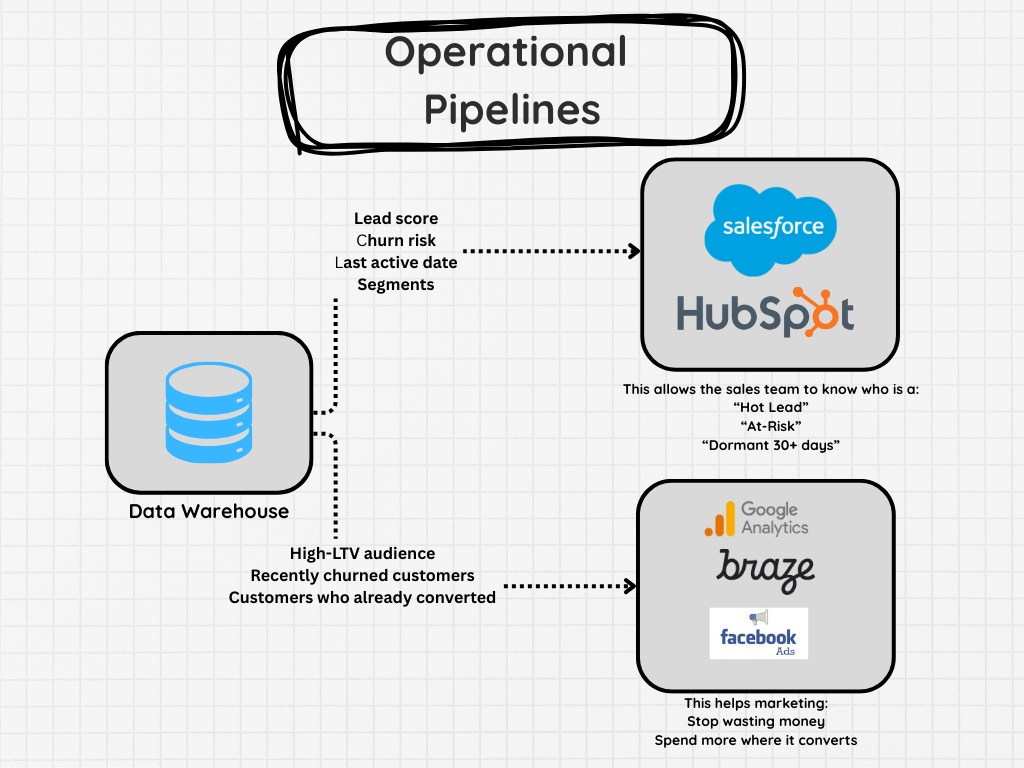
Once you’ve built your data warehouse, it’s not uncommon to need to ingest data back into operational systems. A common example I have seen here is segmentation in Salesforce. Many companies I’ve worked with export their data out, enrich it, then ingest it back into Salesforce.
Some other examples include ingesting data into Netsuite, Hubspot, and a dozen other platforms.
The difference between this and other pipelines is the fact that you have to interact with different systems for ingestion. Some tools allow you to create a CSV to upload data, others require API interactions, etc.
Meaning this isn’t as simple as loading into a database. You often need to work around the other tools limitations.
These pipelines often straddle the line between a software and data project. Not all the systems you’re looking to re-integrate the data back into allow for batch data loads. Instead, you have to update a single record at a time and run verifications after to ensure you don’t blow up your ERP or CRM.
Before concluding this newsletter, I’ll add that these are just a few examples of the types of data pipelines you’ll likely work on. Here are a few more.
Machine learning pipelines
Integration pipelines
Migration Pipelines
Metadata & Lineage Pipelines
What else did I miss?
Final Thoughts
When data teams say data pipelines, it really can mean so many different things. Maybe it’s someone’s semi-automated VBA script that requires a few different people to process each new data set. Maybe it’s a fully automated system that processes a hundred different versions of patients and claims data, all to model them into a single final dataset.
But they often have very similar goals. To take data from their source system and make it usable for a different task. May it be a data product, operational workflow, or machine learning model.
Now, despite all of these differences, I will say that these pipelines still require some similar steps. So keep an eye out for the next article.
“What every data pipeline needs” or something like that.
Thanks for reading!
Articles Worth Reading
There are thousands of new articles posted daily all over the web! I have spent a lot of time sifting through some of these articles as well as TechCrunch and companies tech blog and wanted to share some of my favorites!
How I Run System Design Interviews for Data Engineers
By mehdio
After hundreds of technical interviews for data engineering positions, I’ve developed what I call the “exploration” approach to system design interviews. Think of it like exploring a new city: you start with a bird’s-eye view of the whole map, then zoom into specific neighborhoods that look interesting, getting to know some streets really well while keeping track of how they connect to the bigger picture. It’s become my secret weapon for truly understanding a candidate’s technical knowledge while keeping the conversation engaging and productive.
This type of interview matters even more in our current AI-assisted world. Coding matters less than ever before. We can generate vast amounts of code with tools like Copilot or ChatGPT. But understanding how components work, their foundations, and their trade-offs? That’s irreplaceable.
If you’re interviewing with me, consider this your cheat code.
Code Wasn’t The Hard Part (Keep Building)
By Joe Reis
“What I built today might be obsolete tomorrow.”
Earlier this week, a developer told me these words, and it left me thinking for the rest of the week. AI models keep improving, almost weekly (I hear Claude Sonnet 4.7 is dropping imminently). The model from a few months ago, and definitely earlier this year, is legacy. And especially since OpenAI is in Code Red (again), it seems there’s a renewed race among hyperscalers to release better models and improve their model ecosystems.
End Of Day 206
Thanks for checking out our community. We put out 4-5 Newsletters a month discussing data, tech, and start-ups.
If you enjoyed it, consider liking, sharing and helping this newsletter grow.
This is great, thank you! And I’d argue that the Excel / Google Sheets “pipeline” is probably the most common one of all!
Thank you, clear and concise article